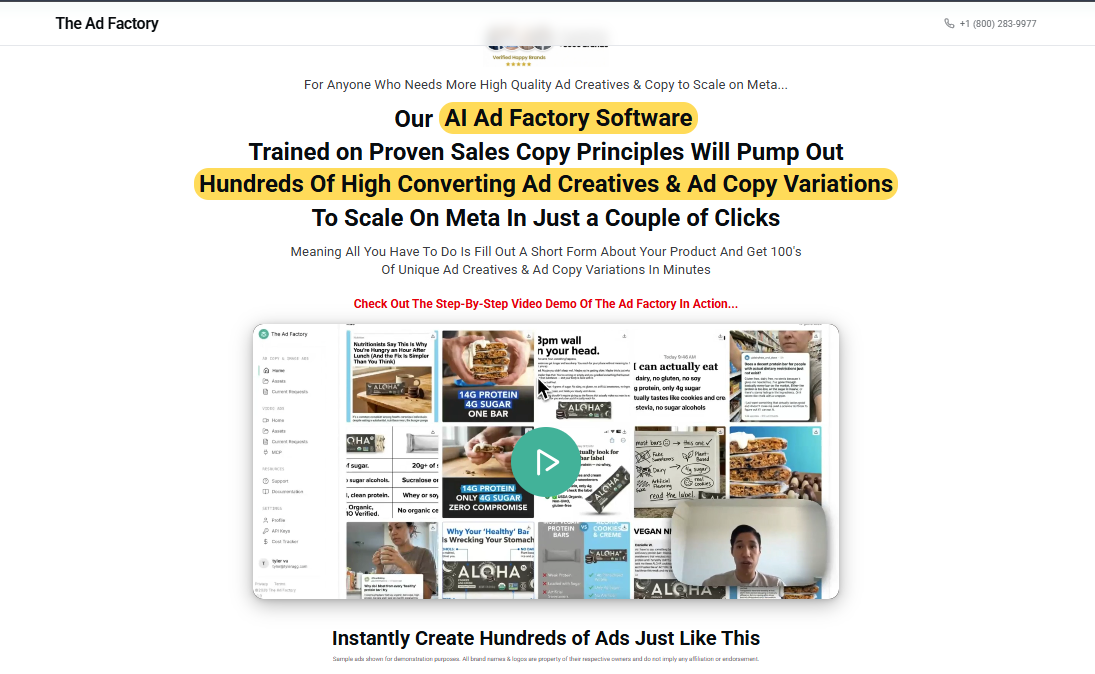

Description
Ad Oven – AI Ad Factory + Ad Factory Dashboard Review: Is It Worth Your Marketing Budget?
Scaling digital ad campaigns manually can quickly become a bottleneck. Digital marketers, e-commerce store owners, and agency operators spend dozens of hours every week writing ad copy, designing creative variations, configuring targeting parameters, and analyzing campaign performance metrics across multiple platforms.
The Ad Oven – AI Ad Factory + Ad Factory Dashboard ecosystem promises to solve this bottleneck. Positioned as an end-to-end, AI-powered content generation and campaign management platform, it aims to streamline creative production and performance tracking into a single unified workspace.
This review offers an in-depth analysis of what this software delivers, examining its core feature set, real-world functionality, user experience, potential limitations, and overall return on investment.
What Is Ad Oven – AI Ad Factory + Ad Factory Dashboard?
At its core, this software suite is built to bridge the gap between creative execution and media buying efficiency. Instead of forcing marketers to toggle between separate AI text generators, graphic design tools, and advertising management consoles, the system integrates these steps into a dual-engine workflow:
-
AI Ad Factory: The generative engine responsible for producing headline variations, long-form body copy, call-to-action (CTA) buttons, and visual ad concept angles tailored to specific industries or niches.
-
Ad Factory Dashboard: The centralized administrative hub designed for campaign monitoring, creative asset organization, performance analytics, and workflow management.
Together, these components provide a streamlined pipeline that takes a product URL or seed brief and transforms it into launch-ready creative assets within minutes.
Key Features & Core Architecture
1. The Generative Engine (AI Ad Factory)
The creative engine relies on trained large language models fine-tuned specifically on direct-response marketing principles. Unlike generic AI writing assistants that generate broad, conversational prose, this engine focuses heavily on conversion-oriented frameworks such as:
-
AIDA Framework: Attention, Interest, Desire, Action
-
PAS Framework: Problem, Agitate, Solution
-
BAB Framework: Before, After, Bridge
Users input basic parameters—such as brand domain, target demographic, unique value proposition (UVP), and offer details—and the platform generates dozens of distinct text variations formatted specifically for platforms like Meta, Google, TikTok, and LinkedIn.
2. Visual Concept & Media Asset Generation
Modern digital advertising relies heavily on visual variation to combat ad fatigue. The creative factory includes template options and media generator prompts designed to produce image compositions, display banners, and short-form video hooks. It standardizes aspect ratios across:
-
Square Formats (1:1 for feed placements)
-
Vertical Formats (9:16 for Stories and Reels)
-
Horizontal Formats (16:9 for display networks and desktop feeds)
3. Centralized Asset Management (Ad Factory Dashboard)
Once assets are generated, managing creative chaos becomes the main operational challenge. The dashboard organizes generated copy and visual assets into distinct project folders categorized by client, product line, or active campaign.
Key capabilities within the dashboard include:
-
Version Control: Track edits and revisions across different copy variations.
-
Tagging & Filtering: Categorize creatives by hook type, angle (e.g., social proof, urgency, feature-led), or target persona.
-
Export Capabilities: Download asset packages formatted for direct upload into native ad managers or third-party scheduling systems.
Hands-On User Experience & Workflow Setup
Getting started with the platform involves a straightforward three-step setup:
Step 1: Campaign Briefing & Seed Data
To begin producing assets, you input primary seed information. The system accepts simple product page links, brand descriptions, or manual parameter inputs. The clearer your seed inputs regarding customer pain points and product features, the higher the output quality will be.
Step 2: Batch Asset Generation
Once parameters are locked in, the creative engine processes the inputs and produces batch outputs. A single prompt run yields multiple headline variations, hook sentences, body paragraphs, and proposed visual angles.
Step 3: Refinement and Dashboard Organization
Users can review outputs within the central dashboard, making inline edits, saving high-performing variations to favorites, or discarding weaker concepts. The interface allows team members to collaborate on creative approvals before media deployment.
Strengths & Advantages
-
Drastic Reduction in Production Time: What typically takes a team of copywriters and graphic designers hours to draft can be generated in preliminary formats in a few clicks.
-
Focus on Direct-Response Principles: Asset outputs adhere to structured direct-response copywriting methodologies rather than generic informational text.
-
Streamlined Asset Organization: Having generated assets automatically flow into an organized workspace eliminates file-naming chaos and scattered asset drives.
-
Ad Fatigue Prevention: Generating dozens of creative variations makes running aggressive creative testing campaigns and replacing fatigued assets easier.
Areas for Improvement & Considerations
While the platform offers clear efficiency gains, a few operational considerations remain:
-
Human Oversight Required: As with all generative AI tools, human review is essential. Outputs require manual proofreading to ensure voice tone alignment and compliance with platform ad policies.
-
Visual Originality: While template-based visual concept generation provides a solid foundation, hyper-custom or complex brand identity work may still require dedicated design polish in tools like Photoshop or Figma.
-
Initial Learning Curve: Navigating the complete dashboard functionality and organizing multi-campaign asset structures effectively requires a brief onboarding period for new team members.
Performance Comparison: Manual Workflow vs. Platform Integration
Pricing & Value Proposition
Evaluating software investment comes down to time savings versus subscription cost. For freelancers, media buyers, and growth agencies spending significant hours drafting copy and assembling assets manually, the time saved per project can quickly offset the platform fee.
If your operation requires launching multiple new ad variations each week across various channels, automating creative foundation tasks provides a clear competitive edge in scaling speed.
Final Verdict
The Ad Oven – AI Ad Factory + Ad Factory Dashboard system delivers a solid, highly structured solution for performance marketers looking to scale their creative output without ballooning overhead costs. By marrying automated copy and concept generation with a clean administrative interface, it solves the dual challenge of creative production and asset management.
While it does not completely replace the strategic mind of an experienced media buyer or brand strategist, it acts as an effective force multiplier—handling technical heavy lifting and asset drafting so marketers can focus on high-level strategy, audience research, and offer optimization.
Final Score: 4.5 / 5 — An impressive, practical asset generation workspace for modern digital advertisers.




Reviews
There are no reviews yet.